

Gaming Room Setup

Your gaming room setup can be nearly anything you want it to be, but there are some necessities:
- Game system
- Monitor
- Peripherals and controllers
- Gaming desk and chair
Once you’ve got the basics, customize the space to make it your own.




Start With a Gaming Computer or Console

You can play some games with a standard computer, but a gaming computer or game console offers better performance and compatibility with more games. Whether you choose performance with a desktop, gaming on the go with a laptop or easy setup and multiplayer connections with a console, match the system to the games you want to play:
- Invest in better speed, memory, graphics and storage to extend the life of your system.
- Look for desktop computers that let you upgrade components like memory and graphics cards.
- If you enjoy multiplayer gaming, choose a system that works with the setups your friends use.
Connecting your system to your router with an Ethernet cable gives you the best speed and performance, but if you need to use Wi-Fi, choose a router that maximizes the speed your service provides.
Make sure your computer or console has plenty of space for ventilation and cooling. If you have a laptop, consider a laptop cooling pad.
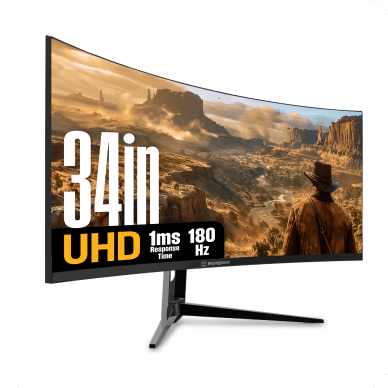
Add a Gaming Monitor That Keeps up With the Action

For smooth gameplay, a gaming monitor is a step up from a standard monitor:
- High refresh rates (in hertz or Hz) and response times (in milliseconds or ms) give you smoother action with less blurring.
- Get better color and detail with enhanced brightness and contrast options.
- Make sure your gaming computer or console supports the specifications of the monitors.
- Add additional monitors to extend your view and stay on top of in-game chats.
- Experience more immersive gameplay with extra-wide, curved monitors.
Use surge protectors for your electronics and connect your computer to an uninterruptible power supply (UPS) for power protection. Read our surge protector guide to find the best equipment to safeguard your electronics.
Plan Your Gaming Desk Setup

Don’t underestimate the importance of your gaming desk and how you set it up:
- Make sure the desk is big enough and sturdy enough for your hardware.
- Look for built-in cable management and power strips.
- Consider desks that offer a range of colors and with built-in LED lighting to help give your gaming room the right ambience.
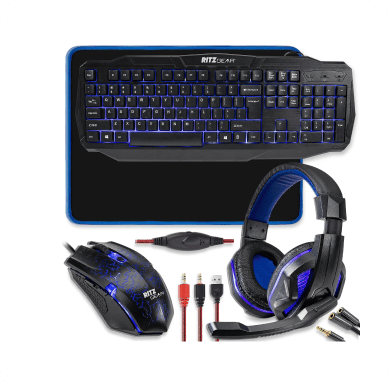
Now it’s time to add gaming desk accessories and peripherals to create the perfect setup.
Gaming Chair

Gaming chairs offer reclining backs, headrests and leg support for comfort over long online sessions:
- Look for features like reclining backs, headrests, lumbar cushions and leg support.
- Different colors and styles let you match your chair to your gaming room décor.
Speakers

Left- and right-channel speakers create a basic system that can be a starting point, but for a gaming room, you might want room-filling sound:
- A speaker system that adds a subwoofer to your left and right channels gives your games a bass boost.
- For surround sound, look for a home theater speaker system, with left and right front and rear speakers, as well as a subwoofer.
- Make sure the connection, typically Bluetooth or a 3.5mm plug, works with your system.
Headset

If multiplayer gaming is your focus or if noise is a concern, you’ll need a gaming headset:
- Headsets often plug into a system with a USB or 3.5mm plug, so choose one that’s compatible with your setup.
- Look for a retractable or flip-up mic, as well as volume and mute controls that are easy to reach.
Game Controller

A game controller works with many types of games, including action games, racing games and flight sims:
- A controller is standard with most game consoles, but if you have friends over, you need extras.
- You can point and click through some computer games with a mouse, but computers also support gaming controllers for many sports, racing and flight games.
- As with any equipment, make sure your controllers work with your system.
If you’re serious about racing sims, give your wheel and pedals a sturdy base with a racing wheel stand. Compact models conserve floor space while cockpit-style stands include a gaming chair for more comfort and immersion.
Gaming Room Organization Ideas and Personalization
Organize your gamer setup to create a professional, polished look:
- Add shelving to display collectibles like action figures and vintage gaming gear.
- Use cord covers and organizers to reduce clutter on your floor and desk.
- Use pegboard to keep unused headsets and controllers out of the way.
- Keep your desktop computer or console off the floor to minimize dust and improve airflow.
- Install LED strip lights behind monitors and along walls for mood lighting.
- Add sound-absorbing foam panels to keep the noise down in surrounding rooms.
- Get a chair mat to protect your floors and allow smooth rolling.
- Add a couch or loveseat and a stand-up arcade game to keep friends comfortable and entertained.
Small Gaming Room Ideas

If space is tight, get creative with your game room design. For example:
- Tuck a compact L-shaped desk into a corner for more useable floor space.
- Conserve desk space with clamp-on monitor mounts, wall mounts or ceiling mounts.
- Opt for a compact sound bar instead of a full-size speaker system.
- Install floating shelves to keep unused hardware and controllers out of the way.
Find Gear for Your Type of Gaming
Shop Lowes.com for gaming computers and monitors, as well as gaming desks and peripherals for your gaming room design needs. Stop by your local Lowe’s to find what you need to organize and personalize your gaming room. Our Red Vest associates can help you choose the right shelving, cable management systems, LED lighting and more.